
Text Effects by Akis
Resource PackText Effects similar to the plugin ItemsAdder
Core ShadersDecoration
1,465 downloads
19 followers
90% of ad revenue goes to creators. Go ad-free while supporting creators with Modrinth Plus. Subscribe today!
Text Effects by Akis
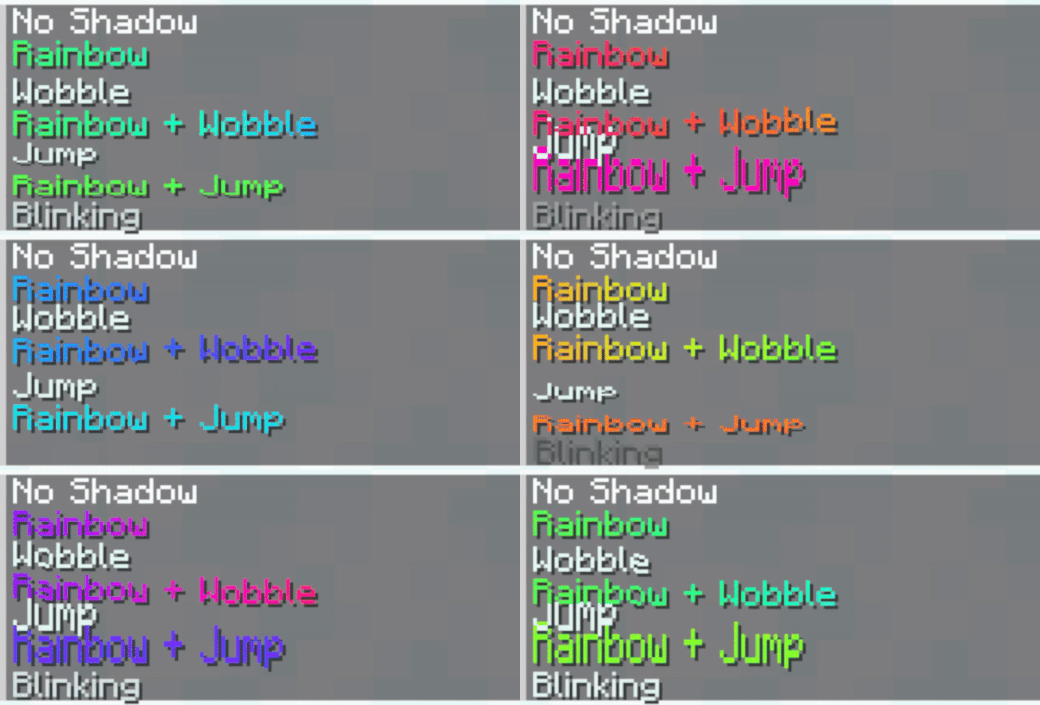
Discover a collection of stunning text effects. Originally made for Nexo, these effects can also be used in vanilla Minecraft by applying the correct hex color codes to your text.
Effects and Their Colors
| Effect | Hex Color |
|---|---|
| No Shadow | #4e5c24 |
| Rainbow | #e6fffe |
| Wobble | #e6fffa |
| Rainbow + Wobble | #e6fbfe |
| Jump | #e6fbfa |
| Rainbow + Jump | #e6f7fe |
| Blinking | #e6f7fa |
How to Install
Nexo:
- Download the latest version of the resource pack
- Put the ZIP file into your
plugins/Nexo/pack/external_packs - Open
settings.yml, findgenerate_gif_shadersand make sure it's set tofalse
Check Compatibility for more info - Go into the game and run
/n rl allto reload Nexo - If that doesn't work, restart your server
- Et voilá, you're done!
How to Use
- Copy the hex color code for your desired effect.
- Apply it to your text in Minecraft using formatting tools or plugins.
- Enjoy the results!
Compatibility
- As these effects use the rendertype_text core shader, they are incompatible with some plugins that add content using these shaders, such as:
| Plugin | Compatible | Mergable | Disable |
|---|---|---|---|
| Nexo | ⚠️ | Manual | generate_gif_shaders in settings.yml |
| Custom Nameplates | ⚠️ | Manual | ? |
| MythicHud | ⚠️ | Manual | ? |
| "Better"Hud | ❌ | ? | ? |
Compatible:
✅ - Fully Compatible without doing anything
⚠️ - Requires merging/disabling a setting
❌ - Incompatible/untested
Mergable:
Manual - Requires to be merged manually
Auto - Plugin automatically merges it
No - Not mergable
Disable:
some_setting - Setting to disable if you don't want to merge
Contact
- if you need help, feel free to join the discord or open a github issue
Preview